Start a thread
A thread is the home for one line of research. It keeps the conversation, context, plans, experiments, reports, and interpretation together so you can leave the work and return without reconstructing it from scratch.
Start with the question
Choose New thread and describe the question or output. Include required data, models, evaluation criteria, safety boundaries, compute limits, and output format.
Choose how Silico works
The model picker configures three roles:
- Planner develops plans and maintains the research direction.
- Worker runs experiments and produces reports.
- Critic reviews plans and evidence.
Subagents use the current model of the role that launches them, including report and summary writers. Silico retries failures on that model and can use another compatible endpoint for the same model; it does not automatically switch research models. If recovery fails, retry the work or choose another model in the picker. A model change applies to later launches; children already running keep their launch model.
The thread composer also controls Auto-accept. When enabled, plans and questions proceed after a review window unless you pause them.
What Auto-accept does
Auto-accept keeps a visible review window rather than launching work immediately:
- A ready plan launches when its review window ends.
- An unanswered question proceeds using the available context when its review window ends.
- Interacting with a question extends its review window.
Choose Pause on a plan or question when you need more time. Resume starts a fresh review window without turning Auto-accept off for the rest of the thread.
If a launch fails or the organization cannot admit more work, the plan or question remains pending for you. Auto-accept never marks an unsuccessful launch as completed.
Attach context at the point of use
Open Add files, code, models in the composer. You can:
- upload files from your computer
- upload from a connected cluster
- browse existing resources
- browse files by location
- add a GitHub repository
- add a Hugging Face model or dataset
- add an arXiv paper
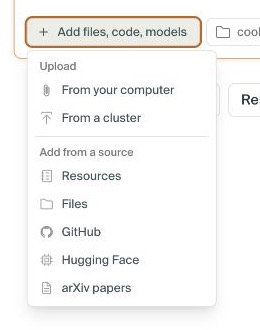
State how an attachment should be used, including any relevant revision, split, branch, path, or subsystem.
For repositories, name the branch, path, or subsystem when the whole repository is ambiguous. Connect GitHub for private repositories.
Private or gated Hugging Face resources require a connected token. Files on compute require access to their location.
You can also attach an earlier thread or report and state how it relates to the new work.
Steer through the thread
Use the thread conversation to change the question, request work, and review plans.
While Silico is working, a new message queues behind the current action. Stop the current action when the direction is wrong and should not finish.
Answers to Silico's questions remain in the thread record.
Return to long-running work
Summary shows the current synthesis, active work, and recent reports. Timeline shows plans, experiments, decisions, and reports in chronological order.
For an older thread without a summary, choose Generate from past runs.
Use the code icon when the thread has a codebase and you need its files or history.
Keep one research direction together
Continue a thread to retain its existing context. Fork creates an independent thread from a specific completed response and excludes later source turns. A new thread starts without that history unless you attach it.
Folders, pinning, and search help you navigate threads without changing their research identity. See Organize threads.
Next step
When Silico proposes a plan, continue with Review and launch a plan.