Environment and credentials
Most work can begin with the defaults. Settings store credentials, integrations, runtime variables, compute connections, and instructions beyond a single thread.
Personal and organization scope
Open the account menu and choose Settings:
- Personal settings apply to your work and credentials.
- Organization settings provide shared defaults and controls.
Personal settings apply to one member. Organization settings apply to the organization and require Admin or Owner access to change.
GitHub connections are personal. W&B and Hugging Face connections can be personal or shared at organization scope.
Custom instructions
Use Custom instructions for evaluation, coding, safety, or reporting guidance that applies across work. Put requests for one thread in that thread.
Personal instructions apply to your threads; organization instructions set the shared default. Never include secrets.
Integrations
Personal integrations include:
- GitHub for browsing and attaching repositories you can access
- Weights & Biases for training runs and metrics
- Hugging Face for private or gated models and datasets
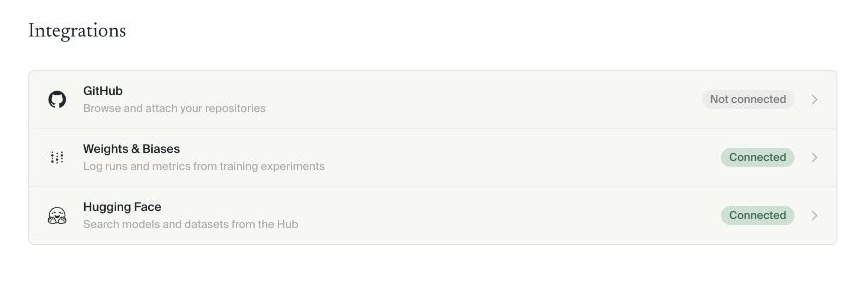
Organizations can share W&B and Hugging Face connections. GitHub remains personal.
Public resources need no connection. Private resources require a connection with access to them.
Environment variables
Use Environment variables for runtime configuration such as API keys. Values are masked after saving.
A personal value overrides a same-named organization value.

Never paste a secret into a thread, plan, report, repository, or support message.
Storage
Personal settings → Storage groups experiment files by organization, folder, thread, and experiment. Choose Refresh, then expand the hierarchy to find what uses space.
Storage cleanup is permanent. Deleting intermediate files can affect later report inspection and follow-up work. Confirm the deletion scope before continuing.
Compute
On-demand compute is ready for most organizations. Admins and Owners can link more options under Organization settings → Compute. Cluster usage shows dedicated infrastructure utilization.
See Compute for the complete workflow.
Next step
Continue with Start a thread.