Compute
Compute settings control accelerator type, runtime, filesystem access, and network access.
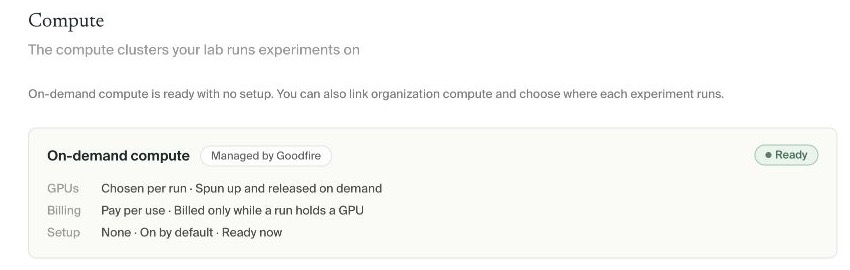
Open Organization settings → Compute to see where experiments can run. Managed on-demand compute needs no setup; Admins and Owners can also connect infrastructure the organization already uses.
Organization settings defines available compute options. Each plan records the option selected for that experiment.
On-demand compute
Managed compute provisions GPUs for an experiment and releases them afterward. Billing applies while an experiment holds a GPU.
A Ready card needs no action. Review the planned accelerator, job count, and maximum runtime before launch.
Linked clusters
Admins and Owners can connect an organization's existing Slurm infrastructure. Open Organization settings → Compute and choose Link another cluster. The cluster must run Slurm and allow unprivileged container jobs.
Enter:
- a recognizable cluster name
- the SSH login host Silico should dial through
- the account mode: each member uses their own account, or the organization uses one shared account
- at least one absolute cluster data-mount path
- an optional output base for experiment files
Choose Register cluster. The first experiment can take up to five minutes to start while Silico prepares the connection.
With per-person accounts, each member adds a key and jobs use that member's cluster identity. With a shared account, jobs use one Unix identity. Access and audit controls for that identity are managed on the cluster.
Native Slurm launch scripts
Enable native Slurm launch scripts supports custom multi-node Ray or MPI launchers. Native host code runs outside Silico's container guardrails with the configured POSIX account's Slurm and filesystem authority.
Enable it only after reviewing scheduler, filesystem, network, and accounting implications.
Choose compute for an experiment
Before launch, confirm that the compute target can reach the required data mounts, credentials, accelerator capacity, and network endpoints.
How files move through compute
The compute target determines how jobs receive inputs and where outputs remain available.
On-demand jobs
On-demand jobs start with an isolated filesystem. They fetch the inputs declared for that job from durable storage; a file mentioned only in the plan is not attached automatically.
Write files that must survive the job to $SILICO_EXPERIMENT_ARTIFACTS_DIR. Silico copies regular files from that directory back to durable storage when the job finishes. Files written elsewhere are scratch and are deleted with the job, and symlinks are not followed during the copy.
Separate on-demand jobs do not share a filesystem. When a later job depends on an earlier output, the plan must attach the exact stored files as inputs to the later job. Do not rely on a path that happened to exist in a previous job.
Linked clusters
Jobs on a linked Slurm cluster use the data mounts configured for that cluster. Large outputs remain in the experiment's durable cluster directory and are not automatically copied into cloud storage.
In both cases, each submitted job receives an immutable snapshot of its code. Editing the experiment after submission changes future jobs, not one that is already queued or running. This keeps an in-flight result tied to the code that actually produced it.
Monitor compute
Use an experiment's Compute view for its jobs, accelerators, runtime, and status. Use Organization settings → Cluster usage for organization-wide GPU and storage utilization on connected dedicated infrastructure.